Introduction: AWS CloudTrail Logs to S3
AWS CloudTrail logs to S3 have the ability to track every API call and user activity across AWS services. These CloudTrail Logs to S3 enable auditing, troubleshooting, and governance visibility into AWS service events. They form the first stage of security workflows for AWS by forming the baseline for any subsequent security investigations and compliance monitoring.
The CloudTrail logs in S3 are the baseline of security workflows because they provide centralized, durable storage for long-term log retention. They also provide cost-effective scalability across multiple AWS accounts and regions, which many organizations often establish. Another important aspect is that it seamlessly integrates with analytic tools like Athena and CloudTrail Lake.
Experience shows that the next stage is where tools like Amazon Athena query and analyze these logs. Further analysis involves correlating events with GuardDuty, Security Hub, and Detective to provide a fuller picture of system event behaviour. Furthermore, EventBridge offers real-time monitoring and anomaly detection and invokes Lambda functions to remediate events.
This article provides an overview of how to configure and secure AWS CloudTrail logs stored in S3. It elaborates on best practices for cost optimization and compliance readiness. Also, it provides methods to analyze, monitor, and troubleshoot CloudTrail data effectively. It is now time to see how we can set up these logs effectively.
Understanding CloudTrail
CloudTrail is the AWS service that records every API call and console action that occurs across all AWS Services. This enables organizations to provide accountability through detailed tracking of user and service activities. Furthermore, organizations can establish governance, auditing, and forensic analysis in their cloud environments. Thereby, maintain their reputation and fulfill legal and regulatory requirements.
There are principally three types of events that CloudTrail captures. First, there are management events that track control-plane operations, such as resource creation or deletion. Next, there are data events that capture object-level activities such as S3 object access or Lambda function invocations. Last but equally important are insight events that identify unusual API call patterns and anomalous behavior.
These events are typically collated into trails with three different types of trails. The lowest level is single-account trails that capture events occurring within a single AWS account and region. The next level is multi-region trails that consolidate logs from all regions for comprehensive visibility. The highest level is organization trails that centralize logging across multiple accounts under AWS Organizations.
There are three key components that make up a CloudTrail log file, making it indispensable for detailed tracking of AWS events. The header information includes version, event time, region, and event source. The user identity details capture the IAM user, role, or service that actually performed the recorded action. The event data section contains API request parameters, responses, and related resources.
How CloudTrail Logs Are Stored in S3
CloudTrail logs to S3, further enhancing its capabilities, where it utilizes a hierarchical folder structure for logging to S3. It organizes this hierarchy by account ID, service, regions, and date.
AWSLogs/<account-id>/CloudTrail/<region>/YYYY/MM/DD/It stores data as JSON log files that are compressed and timestamped for efficient storage and retrieval. Additionally, it utilizes a partition-friendly format optimized for querying with Amazon Athena or AWS Glue.
With the storage structure defined, the next step is to understand how CloudTrail delivers these logs to S3 and what mechanisms ensure their reliability and security.
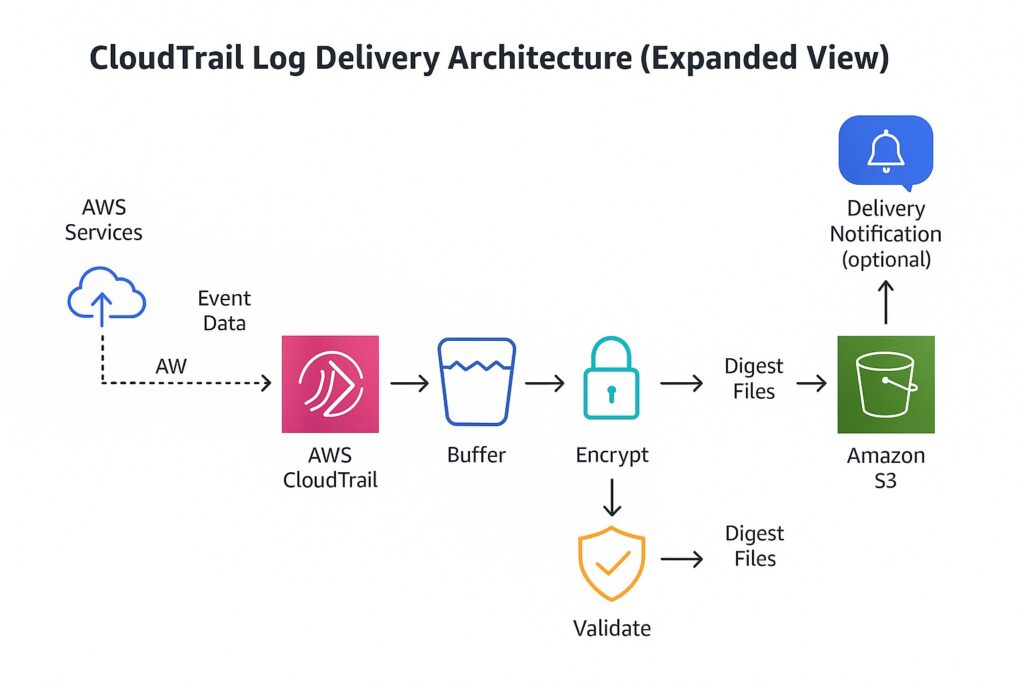
Architecture — How AWS CloudTrail Delivers Logs to S3
Event Delivery Workflow Overview
Whenever an API activity occurs, CloudTrail captures that event and aggregates it with other events into log files. It then buffers these log files and periodically delivers them to the designated S3 bucket. CloudTrail also validates each delivery and timestamps it to ensure completeness and consistency. Optionally, it will send delivery notifications through Amazon SNS for monitoring and alerting.
Log File Delivery Mechanism
CloudTrail has its own internal managed delivery system that it uses to write log files directly to the target S3 bucket. In order to support optimized storage and efficient file transfer, it compresses log files into the .gz format. It also sets each log file name to include a timestamp and unique identifier for traceability. Additionally, delivery adheres to the eventual consistency model to ensure that all events are captured.
Delivery Permissions and IAM Role
There is security around S3 buckets, and it is necessary to configure the necessary permissions. Therefore, CloudTrail uses the service principal cloudtrail.amazonaws.com to write logs to S3. Subsequently, the S3 bucket policy must grant s3:PutObject and s3:GetBucketAcl to the CloudTrail principal. Additionally, the KMS key policy must allow CloudTrail to perform kms:GenerateDataKey and kms:Decrypt actions. These IAM roles and resource policies must also ensure cross-account and organization-wide log delivery.
Encryption and Data Integrity
Given the criticality of log files, it is imperative to ensure their protection. Therefore, CloudTrail supports server-side encryption (SSE-KMS) to protect log data at rest in S3. Additionally, KMS key policies control access to encryption keys used for encrypting CloudTrail log files. Log file integrity is paramount, where integrity validation uses SHA-256 hashes and digital signatures to detect tampering. Additionally, CloudTrail delivers integrity digest files separately to verify the authenticity and completeness of logs.
Regional Replication and Availability
Many organizations operate across multiple regions; therefore, CloudTrail supports multi-region trails that automatically replicate logs from all AWS regions. However, it delivers each region’s events independently to ensure high availability and fault tolerance. S3 Cross-Region Replication (CRR) provides further support by providing additional geographic redundancy. This regional delivery architecture reduces latency and ensures compliance with data-residency requirements.
With the architecture understood, the next step is configuring CloudTrail to send logs to S3 securely and verifying that delivery is functioning as expected.
Configuring AWS CloudTrail to Send Logs to S3
Create the AWS CloudTrail via Console for Sending to S3
This involves signing into the AWS Management Console and opening the CloudTrail service. Next, choose Create trail and enter a unique trail name for identification. To achieve complete visibility of AWS activities, it is necessary to select “All regions” option to capture multi-region. Since CloudTrail is logging to an S3 bucket, the next step is to either specify or create an S3 bucket for storing logs and enabling log file validation. Finally, review configuration settings and then choose Create trail to begin logging events.
Create the AWS CloudTrail via CLI for Sending to S3
Once engineers are familiar with creating CloudTrails via the AWS Console, they often prefer to perform the same setup through the CLI. In this case, they will use the AWS CLI command aws cloudtrail create-trail to define a new trail. They will specify parameters for the CloudTrail, including –name, –s3-bucket-name, and –is-multi-region-trail in the command line. To include integrity verification of delivered logs, they need to add –enable-log-file-validation. Once engineers have created the CloudTrail, they should confirm this through the command aws cloudtrail describe-trails, which verifies the configuration. Finally, to begin event collection, they must execute the following command aws cloudtrail start-logging –name <trail-name>.
Enable AWS CloudTrail Log File Validation
Engineers should choose the log file verification option, whether they are creating CloudTrails via the AWS Management Console or CLI. This option ensures CloudTrail logs’ integrity by detecting any unauthorized modifications. It employs SHA-256 hashing and digital signatures that verify log authenticity. Enabling file verification is available at either cloud trail creation or update at either the Console or CLI. It works by generating digest files that contain hash values for each delivered log file. This is highly recommended for a compliance framework that requires tamper-evident audit files.
Verify AWS CloudTrail Delivery and Permissions
To confirm that CloudTrail is running, check the CloudTrail console to confirm that the trail status shows logging as active. Engineers should then validate that log files are successfully delivered to the specified S3 bucket. They should also confirm correct CloudTrail permissions by reviewing the S3 bucket policy and KMS key policy. Another check involves confirming delivery timestamps, and engineers obtain this through the CLI command aws cloudtrail get-trail-status. Finally, engineers should monitor Amazon SNS notifications and CloudWatch metrics for delivery failures or access errors.
Common Setup Issues and Fixes
There are several setup issues that engineers typically encounter. Often, they miss setting up s3:PutObject or set up incorrect bucket policy conditions, resulting in AccessDenied errors. Additionally, they can forget to establish sufficient key permissions for the CloudTrail service principal, causing KMS decryption failures. Another mistake is using duplicate trail names of existing trails that prevent new trail creation in the same region. S3 bucket replication latency or regional misconfiguration can result in log delivery delays. Whenever data events or organization trails are not properly enabled, then incomplete event capture arises.
After confirming delivery and resolving any setup issues, the next focus is on securing the logs, optimizing cost, and enabling analytics for visibility.
Securing the S3 Bucket for AWS CloudTrail Logs
Implementing a Least-Privilege Bucket Policy
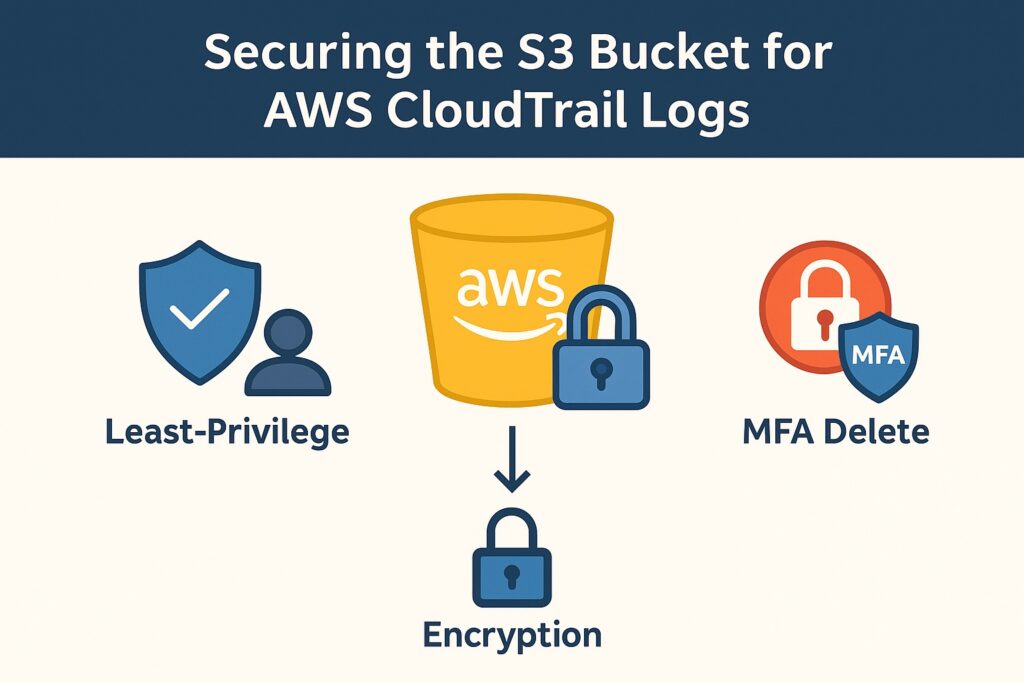
Least privilege is a foundational security principle that applies directly to using S3 buckets for AWS CloudTrail logs. Administrators should grant only CloudTrail and authorized IAM roles permission to write or read logs in S3. They should apply explicit allow statements for required actions such as s3:PutObject and s3:GetBucketAcl in related policies, while implementing explicit deny conditions for all other principals by default. Bucket policies should also restrict access to specific AWS accounts, principals, and prefixes. Finally, administrators should regularly review and update these policies to ensure alignment with organizational security standards.
Partitioning and Query Efficiency in Athena
Amazon Athena is core to log analysis, and configuring its access controls securely is paramount. The first step is to organize AWS CloudTrail logs in S3 using date and region-based partitions for efficient queries. Managing partition metadata is crucial, along with defining external tables; administrators can perform this by using AWS Glue Data Catalog. Also, to reduce query overhead and automate partition discovery, apply Athena partition projection. Administrators can optimize queries by selecting only required columns and filtering using partition keys. These steps ensure Athena delivers consistent performance while maintaining secure, cost-efficient query execution over CloudTrail data.
Applying Server-Side Encryption with AWS KMS
Encrypting logs at rest in S3 is a fundamental requirement. Therefore, administrators should enable SSE-KMS on the S3 buckets to encrypt AWS CloudTrail logs at rest using AWS KMS keys. Another best practice is having greater control over key rotation and access policies, which is achieved by using a customer-managed KMS key (CMK). Administrators must also ensure that the KMS key policy allows CloudTrail and authorized IAM roles to use encryption and decryption. This ensures authorized access to encrypted log files alongside corresponding bucket permissions. To further increase security, administrators should enable automatic key rotation and audit key usage through AWS CloudTrail KMS events.
With encryption and key management configured, the next step is to strengthen protection through versioning and MFA Delete.
Configuring Bucket Versioning and MFA Delete
To further strengthen protection, enable S3 bucket versioning that retains previous versions of CloudTrail log files for recovery and auditing. Additionally, use MFA Delete to enforce multi-factor authentication for versioned object deletions and permanent removals. Furthermore, to prevent accidental or malicious deletion of log data, enforce both version control and MFA protection. It is also vital to verify data integrity and retention compliance by regularly testing recovery of deleted or overwritten log files.
Periodic Validation and Compliance Auditing
Once versioning and MFA Delete are configured, the next step is continuous monitoring to detect any unauthorized access or activity. Therefore, schedule regular reviews of AWS CloudTrail and S3 configurations to verify that logging continues to comply with security policies. Also, continually assess CloudTrail and S3 bucket settings against best practices by using AWS Config rules and Security Hub. Log file integrity validation is paramount and can be achieved by using CloudTrail digest files to confirm that no tampering has occurred. Often, organizations must adhere to legal and regulatory compliance requirements and should document audit results and remediation actions to maintain evidence for audits and certifications.
Best Practices for AWS CloudTrail Logs in S3
With CloudTrail log delivery and S3 bucket security established, the next priority is applying best practices that balance compliance, performance, and cost efficiency.
Lifecycle Policies for AWS CloudTrail Log Retention in S3
Regulatory and audit requirements stipulate retention periods for AWS CloudTrail logs in S3, often spanning several years. However, there are costs involved, and it is essential to maintain these records in a cost-efficient manner during their retention periods. S3 supports this through various storage classes and S3 lifecycle rules. Therefore, use these rules to transition older CloudTrail logs to cost-efficient storage classes, such as Glacier or Deep Archive. To ensure that logs are removed at the end of their retention periods, configure automated expiration policies to facilitate this process.
Partitioning and Query Efficiency in Athena
Continuously improving query performance is vital, given the volume and complexity of AWS CloudTrail logs. Therefore, the reminder is to organize AWS CloudTrail logs in S3 using date and region-based partitions to improve query performance. Another reminder is to use AWS Glue Data Catalog and partition projection to automate partition discovery and reduce query latency. Also, remember to optimize Athena queries by filtering on partition keys and selecting only the required columns.
Cross-Account Access Control and SCP Enforcement
Many organizations operate across multiple AWS accounts, making the orchestration of CloudTrail logging essential. Therefore, implement resource-based bucket policies and IAM roles that securely share CloudTrail logs across AWS accounts in S3. Additionally, apply Service Control Policies (SCPs) in AWS Organizations to enforce consistent access and logging requirements across all accounts. Additionally, restrict cross-account log delivery and access to trusted accounts by using explicit allow and deny conditions.
Cost Optimization Through Storage Classes
Remember to apply best practices around lifecycle policies to improve cost efficiency. Use these to transition older CloudTrail logs to S3 Glacier or Glacier Deep Archive for long-term retention. Additionally, utilize S3 Intelligent-Tiering to automatically move infrequently accessed logs to lower-cost storage classes. Moreover, continually monitor storage and retrieval patterns to optimize costs by using AWS Cost Explorer and Amazon S3 Storage Lens.
Periodic Validation and Compliance Auditing
AWS CloudTrail logs to S3 configurations can never remain static due to the shifting nature of cloud and security environments. Therefore, it is imperative to regularly conduct audits and configuration reviews to verify that CloudTrail and S3 settings align with security policies. There are several AWS services available to achieve this, including AWS Config, Security Hub, and CloudTrail digest files that detect misconfigurations or tampering. Also, engineers should maintain detailed audit documentation and remediation records to demonstrate regulatory compliance.
Analyzing AWS CloudTrail Logs in S3 with Amazon Athena
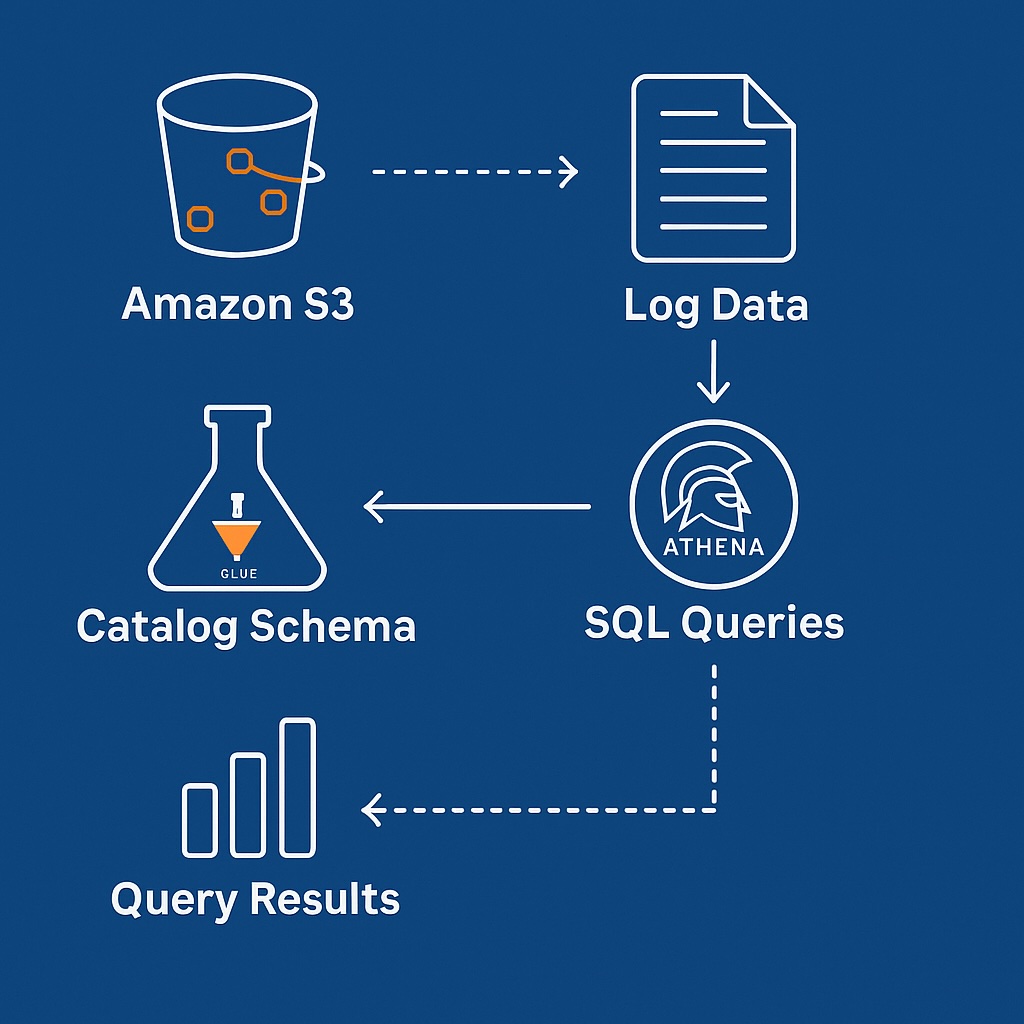
With compliance and cost optimization practices in place, the next step is to analyze CloudTrail logs effectively using Amazon Athena to extract actionable insights.
Setting Up Athena for CloudTrail Analysis
To implement AWS CloudTrail logging to S3, it is necessary first to create a dedicated S3 data store for logs and access configuration. Additionally, to facilitate structured querying, define an external table schema in Athena using AWS Glue Data Catalog. Moreover, improving query performance and scalability is necessary and is achieved by configuring partitions based on date, region, and account ID.
Running Queries for Event Insights
Querying turns AWS CloudTrail logs in S3 from data to information, providing insights. Therefore, querying on the following CloudTrails fields will provide detailed event insights: eventName, userIdentity, sourceIPAddress, and eventTime. Additionally, apply filters to these events to detect anomalies, unauthorized access attempts, or policy violations. Moreover, aggregating and grouping events will contribute to identifying usage patterns, trends, and operational behaviors over time.
Combining Insights from Athena and AWS CloudTrail Lake
Beyond S3-based storage and Athena querying, AWS CloudTrail Lake provides interactive querying and long-term analytics capabilities. It also achieves this without the need for manual setup of tables or management of storage formats. Therefore, engineers can leverage CloudTrail Lake’s built-in event data store to perform on-demand search and investigations without managing schemas. However, Athena is still needed for querying and correlating AWS CloudTrail logs in S3 with other AWS service datasets for contextual analysis. Moreover, engineers should export or cross-reference insights from Athena and CloudTrail Lake to achieve both deep historical analytics and real-time event visibility.
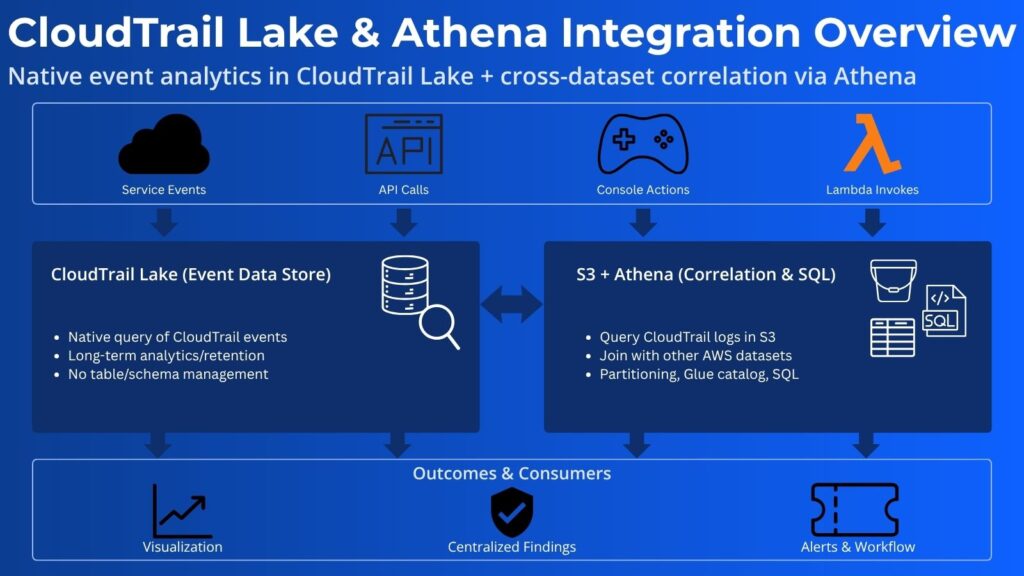
Automating Reports and Dashboards
The result of any logging and querying is information that people or automated entities can act upon. Therefore, effective presentation is essential, and engineers must schedule Athena queries integrated with AWS Glue and Amazon QuickSight for visual reporting. They should also set up automated generation of trend dashboards that highlight API activity, error rates, and security anomalies for operational staff. Security staff require timely displays that are continually refreshed. Therefore, engineers should schedule EventBridge or Lambda triggers to keep Athena datasets and QuickSight visualizations up to date.
Optimizing Query Performance and Costs
Cost is a core architectural pillar and consideration, and engineers should always endeavor to improve query optimization. Therefore, engineers should consider applying selective column projection, partition pruning, and filtering by event attributes. Further cost management is achieved by reducing the amount of data scanned through compression, partitioning, and the use of columnar formats, such as Parquet. Additionally, engineers should set up continuous monitoring of Athena query metrics and continually tune query frequency to align with business reporting needs.
Monitoring and Troubleshooting AWS CloudTrail logs in S3
AWS CloudTrail logs in S3 still have many complexities that require active maintenance through monitoring and troubleshooting.
Continuous Log Delivery Monitoring with CloudWatch
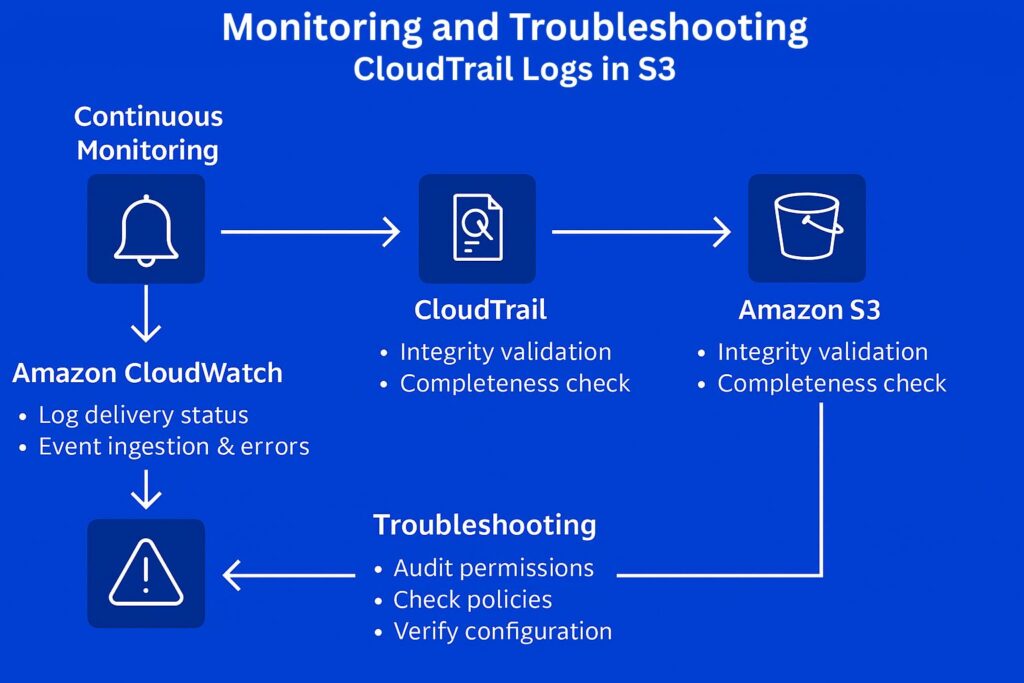
Engineers should continuously monitor the status of AWS CloudTrail log delivery to S3 and any failures by setting up CloudWatch metrics and alarms. Additionally, they need to track event ingestion latency and error metrics for timely issue detection. Therefore, they must leverage CloudTrail’s built-in metrics in Amazon CloudWatch that include DeliveryErrors and DeliveryAttempts. They can track latency by comparing log timestamps to delivery times and derive EventDeliveryTime, which is not a built-in metric. Presentation is always crucial and they should set up CloudWatch dashboards to visualize delivery trends and identify anomalies.
Validating Log Integrity and Completeness
We have already mentioned using CloudTrail digest files to verify log integrity and to detect tampering or missing entries. Additionally, best practices recommend automating this by using AWS Lambda functions or scheduled AWS Config conformance checks. Also, it is essential to verify and validate AWS CloudTrail log completeness in S3. Therefore, establish automated comparison of event counts between CloudTrail, AWS Config, and service-specific logs to confirm completeness.
Troubleshooting Common Delivery Failures
There are several well-known issues that cause common delivery failures, and engineers should check these whenever failures occur. Missing or incorrect S3 bucket policies or KMS key permissions that block CloudTrail write access are a frequent configuration issue. Another common failure source is regional configuration mismatches or replication delays that cause incomplete log delivery. Engineers should also check for service-linked role issues or quota limits that affect CloudTrail’s ability to deliver events to S3.
Integrating CloudTrail with Security Services
To ensure the effective detection of issues related to logging to S3, AWS CloudTrail events must also be forwarded to Amazon GuardDuty for log delivery failure detection and anomaly analysis. The next step is to integrate with AWS Security Hub to centralize findings and automate alert correlation related to CloudTrail. Upon detection of CloudTrail issues, real-time incident responses are the next essential piece supported by EventBridge rules that trigger Lambda functions or SNS notifications.
Establishing Incident Response and Recovery Procedures
Detection of failures related to AWS CloudTrail logs in S3 should automatically trigger responses and recovery procedures. Security personnel should define automated responses that trigger remediation actions through Lambda or Systems Manager Automation. Furthermore, these automated processes should escalate CloudTrail incidents by integrating with AWS Security Hub or external ticketing systems for tracking purposes. Equally important is performing regular recovery drills to validate log availability, data integrity, and response effectiveness following any CloudTrail incidents.
AWS CloudTrail Logs to S3 Summary
AWS CloudTrail is the foundational AWS logging service providing information for security governance and visibility. Along with monitoring, it serves as the initial stage for securing AWS environments, detailed in AWS Logging and Monitoring: Power Up Your Cloud Security. S3 plays a vital role since it serves as the centralized, durable, and cost-efficient storage solution for CloudTrail logs in AWS.
However, the architecture that supports logging must include encryption, IAM permissions, and integrity validation. Therefore, security administrators must configure both S3 and AWS CloudTrail via either the Console or CLI for consistent, multi-region log collection. Additionally, they should follow S3 bucket security best practices, including least privilege, MFA Delete, and versioning. Furthermore, integrating Athena and CloudTrail Lake will enable log analysis, anomaly detection, and compliance reporting. Moreover, the architecture should ensure CloudTrail reliability by implementing continuous monitoring, troubleshooting, and incident response for CloudTrail.
Further Reading
AWS Certified Security – Specialty Study Guide: Specialty (SCS-C02) by Stuart Scott
Mastering AWS Security by Albert Anthony
AWS Security by Dylan Shields
Serverless Analytics with Amazon Athena by Anthony Virtuoso
Affiliate Disclosure: As an Amazon Associate, I earn from qualifying purchases. This means that if you click on one of the Amazon links and make a purchase, I may receive a small commission at no additional cost to you. This helps support the site and allows me to continue creating valuable content.