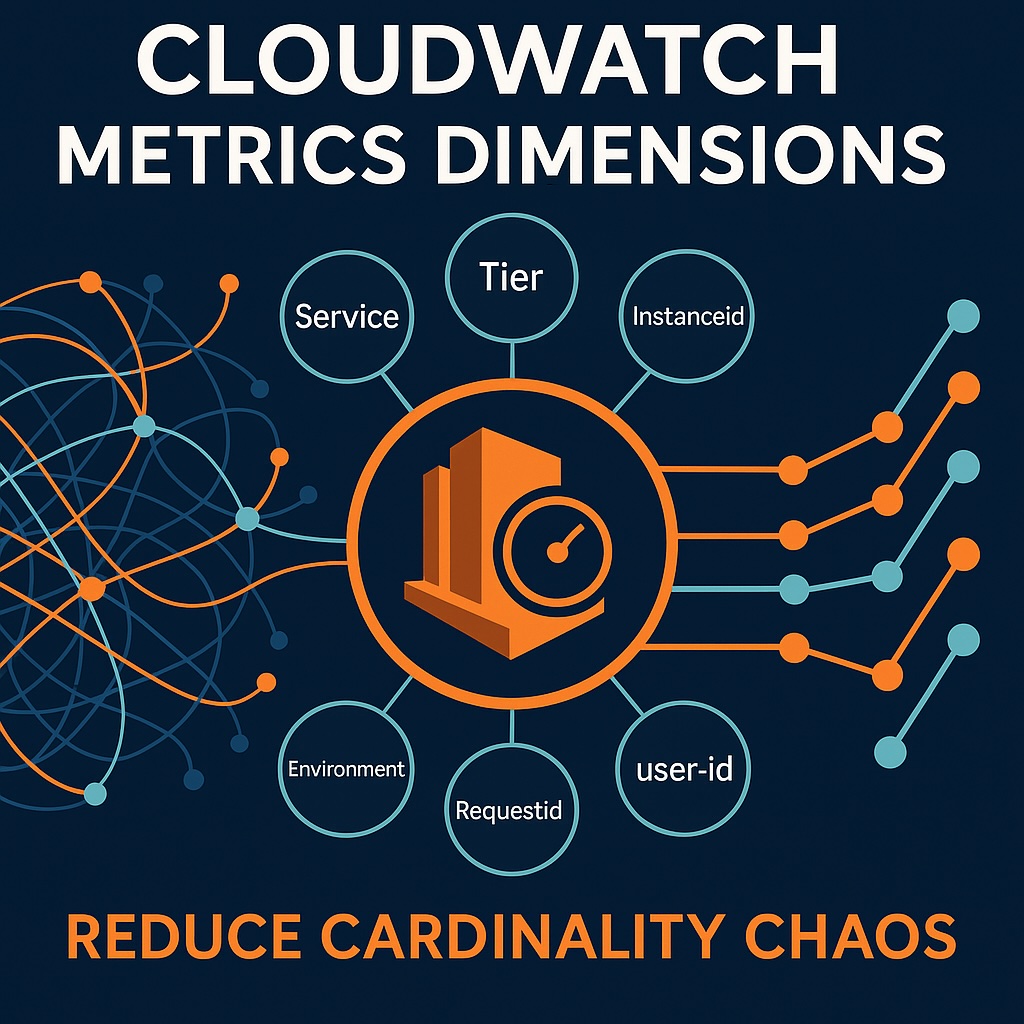
CloudWatch Metrics Dimensions: Introduction to Best Practices
Best practices in CloudWatch metrics contribute to a comprehensive view of the cloud environment, along with their dimensions, providing the necessary metadata. Each dimension is a key-value pair associated with a CloudWatch metric. They enable grouping, filtering, and slicing metrics across services, environments, and resources. They make the foundation for meaningful dashboards, targeted alarms, and efficient metric queries.
Reliable metric patterns provide real-time insights into performance, complementing logs that capture underlying activity and audit trails. Therefore, best practices ensure reliable metric patterns for accurate dashboards and alarms. Furthermore, they reduce unnecessary time-series creation and keep cardinality manageable. Moreover, they contribute to controlling CloudWatch storage and query costs by utilizing efficient dimensions. While CloudWatch provides a strong foundation for AWS-native monitoring, choosing the right observability tool depends on the broader architecture. For a deeper understanding of how architecture defines security and observability outcomes, see AWS Infrastructure Security: Why Architecture Comes First. A broader comparison across AWS-native, SaaS, and open-source observability platforms is available in CloudWatch vs Datadog vs Prometheus. Engineers evaluating CloudWatch dimensions against Prometheus label-based monitoring models should also see Prometheus vs CloudWatch.
However, there are risks when utilizing CloudWatch metrics dimensions, making best practices critical. Failing to control dimension values can lead to excessive growth in time series and cardinality. Also, whenever metric volume surges, this leads to distorted dashboards and frequent false alarms. Critically, unmanaged metrics expansion will increase CloudWatch storage, retention, and query costs.
Why CloudWatch Metrics Dimensions Require Discipline
This article aims to provide actionable guidance for choosing, naming, and structuring CloudWatch metrics dimensions effectively. It also offers scalable patterns that support reliable dashboards, alarms, and observability workflows. Moreover, it lists techniques to avoid dimension misuse, which can lead to cardinality issues and metric overload.
This guide also builds on the broader principles covered in my pillar article, AWS Logging and Monitoring: Power Up Your Cloud Security. Translating these principles into production environments requires practical implementation patterns.
Affiliate Disclosure: Some links on this page are affiliate links. As an Amazon Associate, AI Cloud Data Pulse earns from qualifying purchases. We also participate in the Pluralsight affiliate program and may earn a commission if you subscribe or purchase through our links, at no additional cost to you. We only recommend courses and resources that provide genuine value to our readers.
Applying this in real AWS environments?
Designing CloudWatch metrics and dimensions effectively becomes much easier when you see how these patterns are applied in real production systems.
These are the resources I recommend when moving from theory to implementation:
These are particularly useful when dealing with large-scale environments where poor dimension design leads directly to cost and observability issues.
• Cloud Observability in Action (hands-on observability patterns used in production systems)
• Architecting for Scale (real-world AWS architecture and reliability patterns)
If you prefer guided, hands-on learning, platforms like Pluralsight offer structured courses on AWS monitoring, CloudWatch, and observability patterns.
CloudWatch Metrics Dimensions Explained (and Why Best Practices Matter)

CloudWatch metrics dimensions are key-value pairs that describe attributes associated with a metric. They are essentially metrics metadata that enable categorizing of metrics by resource, environment, or workload. They are also attached to metrics at creation time, providing context and meaning to metrics data streams.
These dimensions enable precise grouping of related CloudWatch metrics across resources and services, necessitating adherence to best practices. Additionally, they provide filtering, allowing isolation of specific environments, components, or workloads by either manual or automated processes. Finally, cloud engineers can determine how metric queries return structured, targeted time series for analysis and interpretation.
The real value of CloudWatch metrics lies in clear visualizations and coherent dashboard views, providing teams with real-time insights. Best practices in CloudWatch metric dimensions support the construction of these visualizations and dashboards.
Alongside dashboards are accurate and target alarms that alert operators and automated processes to any events of concern. Metrics dimensions enable the establishment of these alarms, further enhancing control over the cloud environment. They also improve analytical depth by allowing focused comparison across environments or resources.
Metrics dimensions also enable clarity in metric interpretation through consistent and predictable dimension structures. This results in improved performance in metric retrieval and dashboard rendering, with optimized dimension usage. Moreover, they enable scalable monitoring workflows through controlled cardinality and manageable time-series growth.
For a deeper understanding of how CloudWatch metrics complement AWS activity logs, see my companion post, AWS CloudTrail Logs to S3: Secure, Store, and Analyze Your AWS Activity.
Common CloudWatch Metric Dimensions by AWS Service
The following AWS-native dimensions are among the most commonly used when monitoring AWS services with CloudWatch.
| AWS Service | Common Metric Dimensions |
|---|---|
| Amazon EC2 | InstanceId, AutoScalingGroupName |
| AWS Lambda | FunctionName, Resource |
| Amazon ECS | ClusterName, ServiceName |
| Amazon EKS | ClusterName, Namespace, PodName |
| Application Load Balancer | LoadBalancer, TargetGroup, AvailabilityZone |
| Amazon RDS | DBInstanceIdentifier, DatabaseClass |
| API Gateway | ApiName, Stage, Method |
Whenever possible, reuse AWS-native dimensions instead of inventing custom ones. This improves dashboard consistency, alarm compatibility, and long-term maintainability.The Golden Rule: Minimize High-Cardinality Dimensions

This is an essential practice with AWS CloudWatch metric dimensions, where a large number of unique dimension values generate many distinct time series. Furthermore, multiple dimensions will multiply together to form high-volume metric combinations. This results in excessive series growth overwhelming dashboards, storage, and analysis tools.
High-cardinality management is also a major architectural consideration in Kubernetes observability platforms like Prometheus, where labels can rapidly expand time-series growth. For a deeper comparison of these monitoring models, see Prometheus vs CloudWatch.
High-Cardinality Anti-Patterns and Cost Impacts
There are several common high-cardinality anti-patterns, including UserId, RequestId, IP addresses, and timestamps. Having dimensions tied to per-request or per-user identifiers can create uncontrolled value growth. Meanwhile, making use of volatile attributes like IP addresses or UUIDs will invariably generate a constantly changing series. Including timestamps or rapidly shifting values will break metric aggregation and stability.
Several detrimental impacts of using high-cardinality dimensions include noisy dashboards, slow queries, and increased CloudWatch costs. Excessive time series will clutter dashboards, thereby reducing clarity and signal visibility. Also, high series volumes will result in slower metric retrieval and degraded query performance. Furthermore, uncontrolled time-series growth will cause CloudWatch storage, retention, and analysis costs to skyrocket. These same telemetry growth patterns also affect enterprise observability platforms, where high-cardinality metrics, retention policies, and advanced monitoring features can significantly increase operational costs at scale. For a deeper enterprise observability pricing analysis, see How Much Does Datadog Cost? The Real Pricing Breakdown.
AWS CloudWatch metric dimension practices aim to limit dimension values and control time-series growth. Therefore, use consistent, low-cardinality identifiers such as service, environment, or resource groups. Furthermore, engineers should avoid either dynamic or user-specific values and consolidate metrics at meaningful aggregation levels. Moreover, engineers should regularly review dimension patterns and continually prune unnecessary series, enforcing controlled growth.
Naming Practices for CloudWatch Metrics Dimensions and Namespaces

Readability is the top requirement for any design or implementation. This makes naming conventions for namespaces, metrics, and dimensions an essential practice for AWS CloudWatch metric dimensions.
A fundamental practice is to ensure consistent and descriptive naming policies. Therefore, ensure labels are clear and uniform, reflecting the service, component, or environment context. Additionally, structure names to convey purpose, behavior, or resource association at a glance. Also, avoid any ambiguous, inconsistent, or overly generic terms that reduce interpretability.
Next, ensure that standardization aligns with AWS conventions to improve clarity and interchangeability. Therefore, use common AWS naming patterns such as service-based or resource-based prefixes. Also, ensure easier integration by aligning with native CloudWatch metric and namespace structures. This will enhance cross-team understanding through the use of familiar terminology and standardized patterns.
Additionally, supporting predictable prefixes, consistent casing, and structured naming schemes will enhance readability and maintainability. Making prefixes predictable and casing consistent will make scanning metric and dimension names easier. Also, as systems and teams grow and evolve, it is essential to structure naming patterns that support long-term clarity. Finally, uniform formats that reduce confusion and onboarding overhead will simplify maintenance.
Reuse AWS-Standard Dimensions Before Inventing New Ones
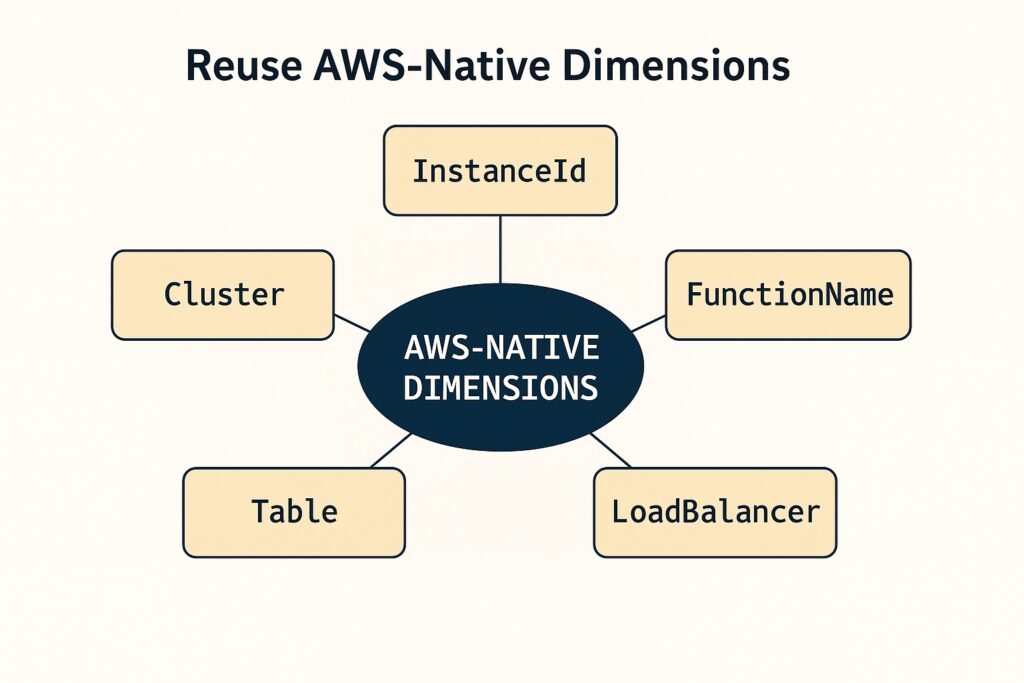
Reuse is a standard methodology in the software engineering profession and is particularly suitable when working with dimensions associated with AWS CloudWatch metrics. Engineers should look to native AWS dimension keys such as instanceID, FunctionName, and LoadBalancer. This provides immediate compatibility with built-in CloudWatch metrics and automatic dashboard groupings. They also simplify the correlation between custom metrics and AWS service behavior for more precise analysis. Moreover, they will reduce the need for custom dimension definitions by leveraging well-known, stable identifiers.
Further benefits from reuse include seamless integration with existing CloudWatch dashboard widgets and visualization templates. Reusing existing native AWS dimensions will yield consistent behavior when querying metrics through the CloudWatch API, CLI, or SDKs. These benefits extend to better alignment with other AWS services, such as CloudTrail, Lambda, and Load Balancers, that rely on standard dimensions.
Through reuse, engineers reduce complexity and cardinality, first by having fewer unique dimension values due to the reuse of stable AWS identifiers. This also lowers the chance of accidental metric explosion from unnecessary or custom dimension keys. Additionally, they simplify long-term maintenance by following predictable and well-established AWS dimension structures.
When to Aggregate vs. Split Metrics by Dimension
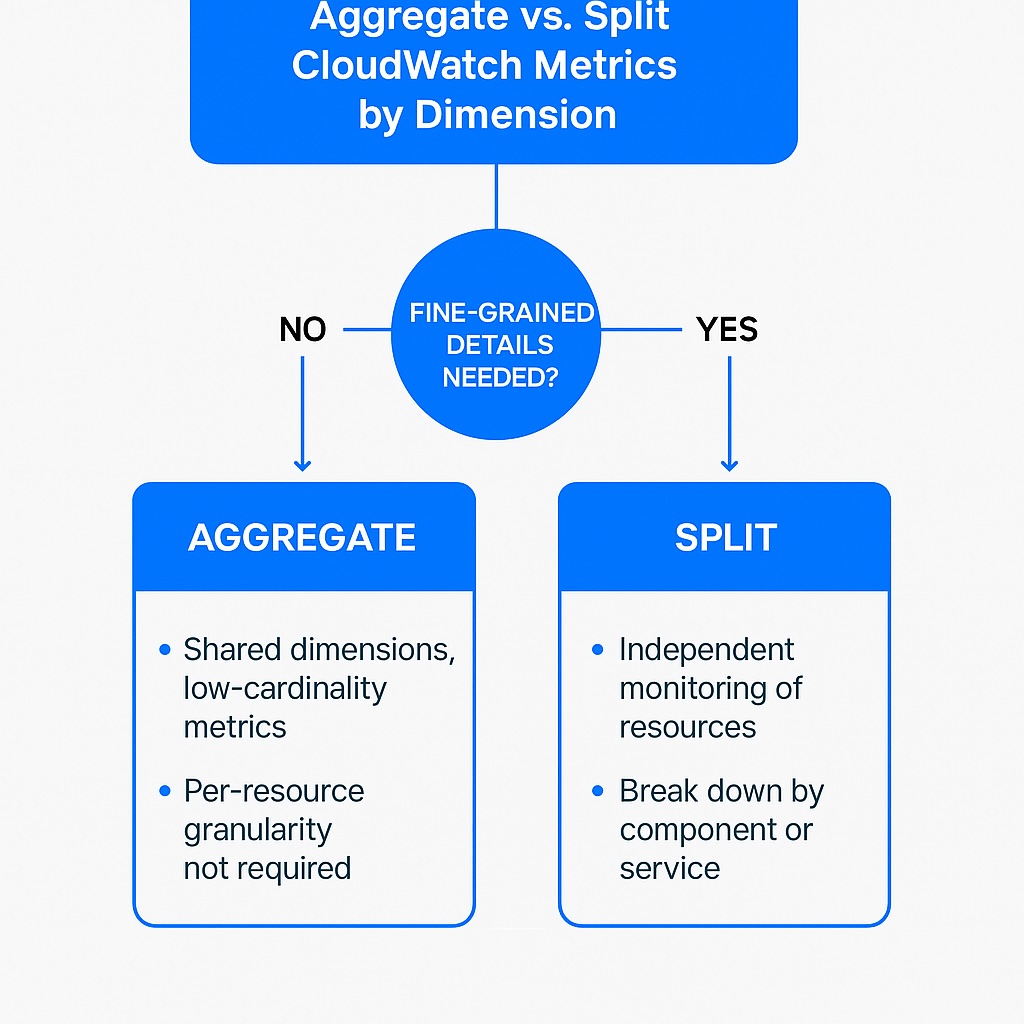
This is an advanced practice with dimensions in designing AWS monitoring using CloudWatch metrics. In some cases, it is preferable to choose aggregation to reduce noise and have low-cardinality metric sets. Here, engineers use shared dimensions, such as service or environment, to consolidate similar metric streams. For cases where fine-grained details provide little operational value, select aggregated metrics. Also, whenever pre-resource or per-instance granularity is not required, then reduce unnecessary time-series.
Conversely, splitting metrics by dimension provides clearer visibility or targeted analysis. Whenever specific components, resources, or workloads require independent monitoring, then separate dimensions. Also, granular breakdown is helpful when looking to isolate performance issues or identify localized anomalies. This extends when engineers need targeted visibility for critical paths, high-value services, or tier-specific behavior.
When making trade-offs between aggregated and granular metrics, take into account performance, cost, and diagnostic precision.
Dimensions to Avoid (IDs, Timestamps, User Emails, UUIDs)
There are certain dimension classes that run counter to sound practices with monitoring using AWS CloudWatch metrics. These include per-user or per-request identifiers that generate constantly shifting and unbounded dimension values. Another class of volatile attributes includes timestamps, IP addresses, or UUIDs, which produce a unique series for nearly every event. These unstable dimension patterns break aggregation consistency and overwhelm dashboards and storage.
Therefore, engineers should consider alternatives to sensitive or volatile dimensions when preserving observability without driving cardinality. They should instead use stable grouping attributes such as service name, environment, or workload type. Additionally, they should aggregate around resource categories or tiers, rather than individual users or request identifiers. When they need to maintain monitoring value, then they should replace sensitive identifiers with anonymized or generalized labels.
EMF (Embedded Metric Format): Turning Logs into Well-Shaped Metrics

What Is EMF (Embedded Metric Format)
Embedded Metric Format (EMF) is a valuable AWS CloudWatch monitoring practice that embeds metric values and dimensions directly within structured JSON log entries. This provides a standardized way for applications to emit metrics without the need for separate instrumentation pipelines. This enables the monitoring process to leverage CloudWatch’s capability to extract and publish metrics from logs with consistent formatting automatically.
How EMF Controls CloudWatch Metrics and Dimensions
Another core EMF benefit is that it reduces cardinality by controlling dimensions before metrics reach CloudWatch. It predefines allowed dimension keys and values within the log-embedded metric structure. Additionally, it aggregates or normalizes variable attributes before CloudWatch ingests the metric. Moreover, it filters out volatile for high-churn identifiers at the source, thereby preventing uncontrolled time-series creation.
Benefits of EMF for CloudWatch Metrics
Further benefits of EMF include creating consistent, query-ready metrics without the need for scraping. This is due to EMF automatically generating CloudWatch metrics from structured logs without custom ingestion code. It also ensures uniform metric formats that simplify querying and dashboard construction. Finally, it eliminates the need for external collectors or scrapers to parse application log data.
This differs significantly from Prometheus, which relies on pull-based scraping models and exporter ecosystems for metric collection. For a broader comparison, see Prometheus vs CloudWatch.
When to Use EMF in AWS Architectures
EMF is applicable whenever there is a need for a unified metric emission across heterogeneous services without requiring different instrumentation libraries. Another use case is for consistent dimension patterns for Lambda functions, containers, and microservices running in diverse environments. Lastly, it is applicable for use cases around simplified troubleshooting by correlating logs and metrics emitted together from the same execution context.
EMF in the Broader AWS Logging Architecture
For broader coverage of AWS logging, including CloudTrail delivery into S3, see AWS CloudTrail Logs to S3: Secure, Store, and Analyze Your AWS Activity.
Alarms that Scale: Dimension Strategies for Composite & Anomaly Alarms
Alarms are the logical next step in monitoring, ensuring that operators and automated processes respond to events in a timely manner.
AWS CloudWatch practices around metric dimensions aim to ensure that alarms trigger consistently across environments and services. Therefore, they stipulate the use of shared dimensions, such as service, environment, or workload, to standardize alarm behavior. They also recommend avoiding resource-specific or instance-level dimensions that create inconsistent or uneven alarm triggering. Another recommendation is to apply uniform dimension patterns so alarms evaluate the same conditions across multiple services and deployments.
When building scalable composite alarm patterns, aggregate metrics along common dimensions to feed these alarms with stable, uniform signals. Additionally, use standardized dimension keys to enable engineers to combine multiple underlying alarms into a single composite evaluation. Furthermore, align metric dimensions across services, tiers, and environments to reduce fragmentation of alarm sources.
Stable, low cardinality dimensions are also applicable to setting up alarms. Therefore, eliminate volatile or per-request identifiers to provide anomaly detection with consistent baseline patterns. Also, use broad, steady dimensions such as service or environment that minimize false positives in anomaly evaluations. By ensuring time-series stability, anomaly detection algorithms will learn normal behavior without distortion.
Finally, make sure that alarm dimensions align with operational workflows for clearer alert routing and incident handling.
Cost Control: Cardinality, Retention, and Metric Streams
All best practices must address cost control, and setting up dimensions for AWS CloudWatch metrics is no exception. A constant theme is to manage cardinality to limit unnecessary time-series creation to control CloudWatch usage costs. Therefore, control dimension values to prevent the explosion of unique metric series that drive up storage and ingestion costs. Also, look for opportunities to consolidate metrics through aggregation whenever fine-grained details do not provide additional operational value. Continually review high-volume dimensions to identify and remove patterns generating excessive time series.
There are opportunities to manage costs related to metric retention and storage. Adjust retention periods based on operational needs instead of maintaining all metrics at full resolution (i.e., metric data point storage frequency). Also, make use of lower-resolution storage tiers and long-term S3 Glacier storage tiers to reduce storage costs. Moreover, apply selective retention policies that retain only high-value metrics for extended analysis.
Telemetry Scaling and Enterprise Observability Costs
Rather than incurring high CloudWatch storage and retrieval costs, stream large metric volumes to S3 or third-party destinations. Additionally, offload detailed or high-frequency time-series data to external analytics platforms that are better suited for large datasets than CloudWatch. Also, reduce CloudWatch ingestion charges by shifting verbose or granular metrics to lower-cost long-term storage classes like S3 Glacier. These cost and cardinality trade-offs also influence architectural decisions between AWS-native telemetry and pull-based monitoring systems like Prometheus. See Prometheus vs CloudWatch. As observability environments scale, organizations must also evaluate how telemetry ingestion volume, retention strategies, and advanced observability capabilities influence enterprise monitoring costs. For a deeper breakdown of enterprise observability pricing considerations, see How Much Does Datadog Cost? The Real Pricing Breakdown.
When Cost Optimization Becomes an Architecture Problem
At scale, controlling metrics, cost, and observability pipelines becomes a design problem rather than a tooling problem.
At this stage, tooling alone is not enough—architectural decisions determine cost, scalability, and long-term observability success. This becomes even more significant when enterprise observability platforms introduce telemetry-based pricing models tied to ingestion volume, retention, and advanced monitoring capabilities. For a detailed breakdown of these pricing dynamics, see How Much Does Datadog Cost? The Real Pricing Breakdown.
This is where deeper architecture patterns become critical in real-world production systems.
The following resources provide practical guidance on designing scalable observability and cost-efficient monitoring architectures:
Security Lens: Least-Privileged Metrics Access & PII in Dimensions
A key concern with best practices around metrics dimensions is sending security-sensitive data to AWS CloudWatch. Therefore, security personnel should restrict CloudWatch metric access to only the namespaces and dimensions required for each team’s responsibilities. They should also set up IAM conditions to limit visibility based on resource tags, environment, or service scopes. Additionally, they should have default policies that deny read access to metrics. This will ensure that operational or security-sensitive metrics are not exposed through any permission gaps.
CloudWatch metrics must not contain PII data and therefore should avoid user-specific identifiers, such as email addresses, account numbers, or session tokens, in metric dimensions. To achieve this, apply sanitization or hashing methods to remove or obfuscate sensitive fields prior to sending metrics to CloudWatch. Implement guardrails in logging and instrumentation pipelines that block PII-bearing dimensions from reaching CloudWatch.
Troubleshooting Checklist: No Data, Too Much Data, or Noisy Alarms
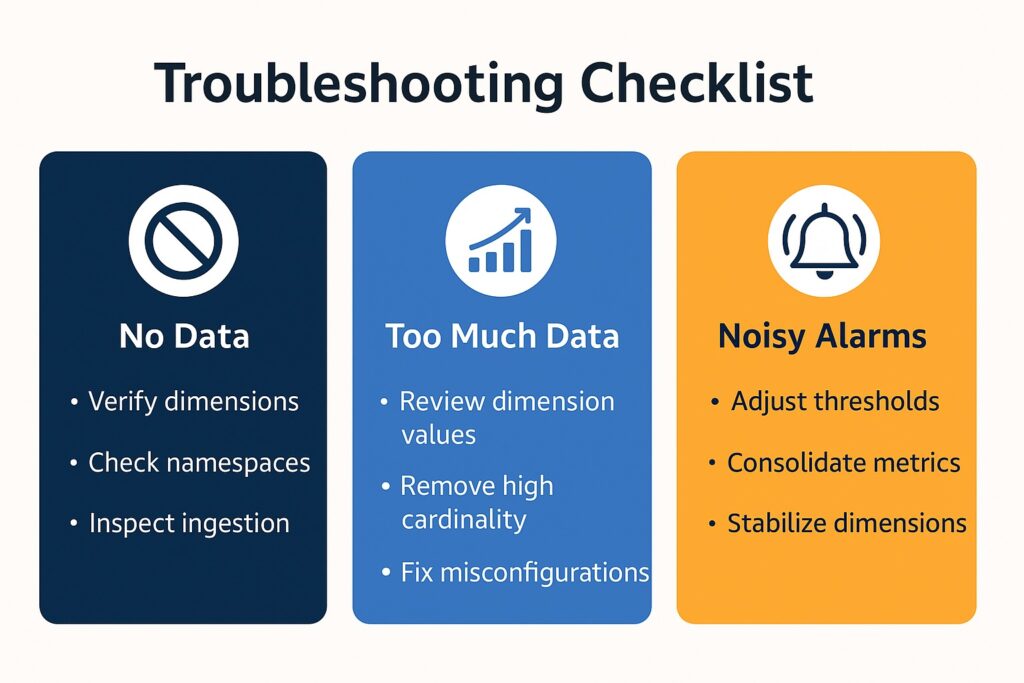
Troubleshooting techniques always form part of best practices, and this includes troubleshooting AWS CloudWatch metrics dimensions. A significant source of issues is misconfiguration. Therefore, engineers should verify that dimension keys, values, and namespaces match exactly between metric emission and CloudWatch queries. Additionally, they should check ingestion sources such as EMF logs, Lambda wrappers, or container agents for dropped metrics or formatting errors.
Because high-cardinality patterns and unintended dimension values can cause information overload, engineers should identify and address these issues. They should review dimension values for runaway identifiers, such as UUIDs, timestamps, or user-specific data, to prevent the creation of unbounded time series. Additionally, identify misconfigured instrumentation that emits overly granular or rapidly changing dimensions not intended for monitoring.
Finally, engineers should resolve noisy or unstable alarms resulting from inconsistent baselines or overly granular dimensions.
Conclusion: Recap on Best Practices for AWS CloudWatch Metrics Dimensions
Clearly, there are several key best practices when performing AWS monitoring using CloudWatch metrics and configuring their dimensions. Firstly, maintain clarity by consistent naming, standardized dimension keys, and the reuse of AWS-native identifiers. Secondly, avoid volatile or high-churn values while aggregating metrics where fine detail provides little value. Lastly, perform ongoing reviews of dimension patterns to control time-series growth and ensure predictable, scalable monitoring.
The goal is to ensure reliable dashboards, alarms, and cost control. Therefore, always ensure that dimension structures are stable for dashboards to remain clear, accurate, and easy to interpret as systems grow. Additionally, evaluating metrics on predictable, low-cardinality dimensions will yield consistent alarm behavior across environments. Finally, disciplined dimension design and aggregation will reduce and control CloudWatch ingestion, storage, and retention costs. These same principles become increasingly important in enterprise observability platforms where telemetry growth directly affects long-term operational and monitoring costs. For a broader enterprise pricing perspective, see How Much Does Datadog Cost? The Real Pricing Breakdown.
These best practices form part of the broader AWS logging and monitoring principles for building secure, observable cloud environments.
Further Reading: CloudWatch Metrics Dimensions Practices
Affiliate Disclosure: As an Amazon Associate, AI Cloud Data Pulse earns from qualifying purchases. Some links in this article are Amazon affiliate links. If you purchase a product through these links, we may earn a small commission at no additional cost to you. We only recommend resources that we believe provide value to our readers.
If you’re implementing these CloudWatch practices in production environments, the following resources are the ones I would personally use when implementing these patterns in production systems
- For observability and monitoring design: Cloud Observability in Action – Practical patterns for metrics, dashboards, and observability workflows.
- For scalable system architecture: Architecting for Scale: How to Maintain High Availability and Manage Risk in the Cloud – Real-world approaches to building resilient cloud systems.
- For broader AWS fundamentals: Amazon Web Services in Action: An in-depth guide to AWS – Foundational AWS concepts across services and architectures.
- For certification-focused learning: AWS Certified Security – Specialty Study Guide (SCS-C02) – Useful if you’re preparing for AWS certification alongside practical learning.
These are especially valuable when moving from isolated metrics into full observability architectures at scale.