Introduction: Why GuardDuty Pricing Isn’t as Straightforward as It Looks
We surveyed GuardDuty best practices, but pricing is of paramount importance since there are budgets to meet and economics to consider. However, this is not necessarily straightforward, and there are several considerations that a robust pricing strategy requires.
The Hidden Complexity Behind GuardDuty Costs
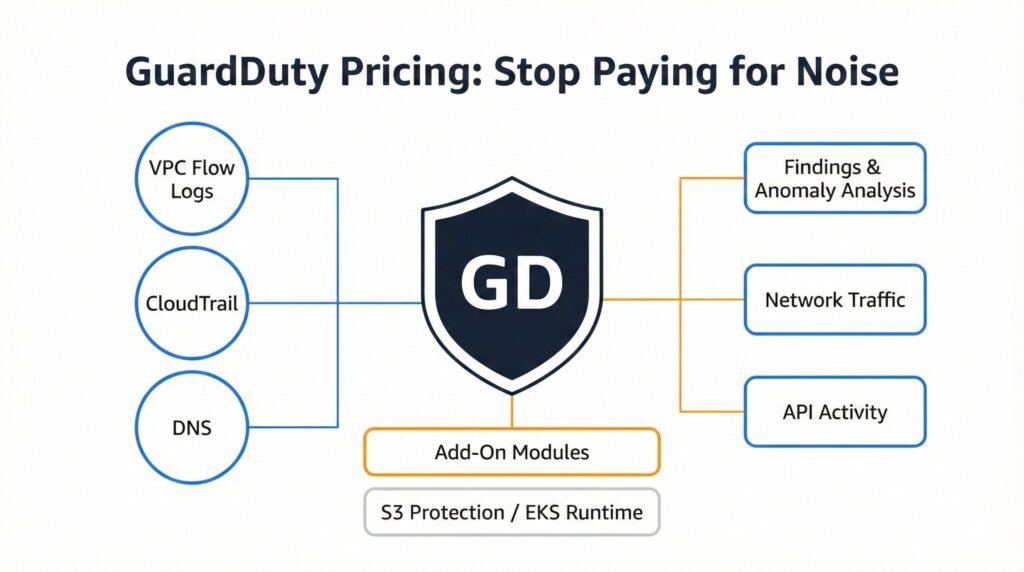
The first consideration is that the different log sources that GuardDuty processes are each priced differently. These include VPC Flow Logs, CloudTrail, and DNS. A further complication arises due to workload behavior driving unpredictable spikes in analyzed data, making costing indeterministic. Finally, any add-on features, such as S3 Protection and EKS Runtime Monitor, will further alter the cost model.
Why Engineers Often Misjudge GuardDuty Pricing
Engineers often misjudge pricing because they assume findings determine most costs, not log ingestion volume. Another common trap is assuming that GuardDuty is a “set and forget” and neglecting to monitor noisy workloads. Furthermore, they will underestimate the impact of high-traffic environments and automation-heavy pipelines.
How GuardDuty Pricing Works (The Short Version)
In order to master GuardDuty pricing, we must first understand how its pricing structure works. We will now seek to demystify this.

Log Sources That Drive Cost
Here, it is not the cost of GuardDuty itself but the cost of the sources feeding data into it for analysis that drives cost. VPC Flow Logs, by nature, generate high-volume traffic data that results in high costs. And to add that, CloudTrail events from API activity, automation, and CI/CD pipelines are also contributing significantly to costs. There are also DNS Query Logs from microservices, containers, and external lookup, adding to their fair share of costs. Not to mention chatty workloads or misconfigured systems, significantly ramping up ingestion workloads.
Findings and Anomaly Analysis
Then there is the pricing of using GuardDuty itself, with a major cost around behavioral baselines evaluated across network, API, and DNS activity. A further cost contributor is anomaly detection, which is applied to spot unusual or suspicious patterns. However, what makes pricing complicated to track is that findings are generated from correlations and, therefore, not charged individually. As mentioned with data sources, having misconfigurations or noisy workloads also significantly increases analysis frequency, adding to overall costs.
Add-On Features That Change the Price
These are what make GuardDuty pricing so tricky to manage since they change its pricing. S3 Protection scanning objects and access patterns across buckets obviously costs due to high S3 storage volumes. Along with that is EKS Runtime Monitoring, which inspects container behavior at runtime, given the ubiquity of containers in modern systems. Whenever data sources are expanded, there is additional associated per-GB analysis that adds to existing costs. Whenever any feature is enabled across multiple accounts or regions, there is a higher cost impact.
The Real Cost Drivers Behind GuardDuty Pricing
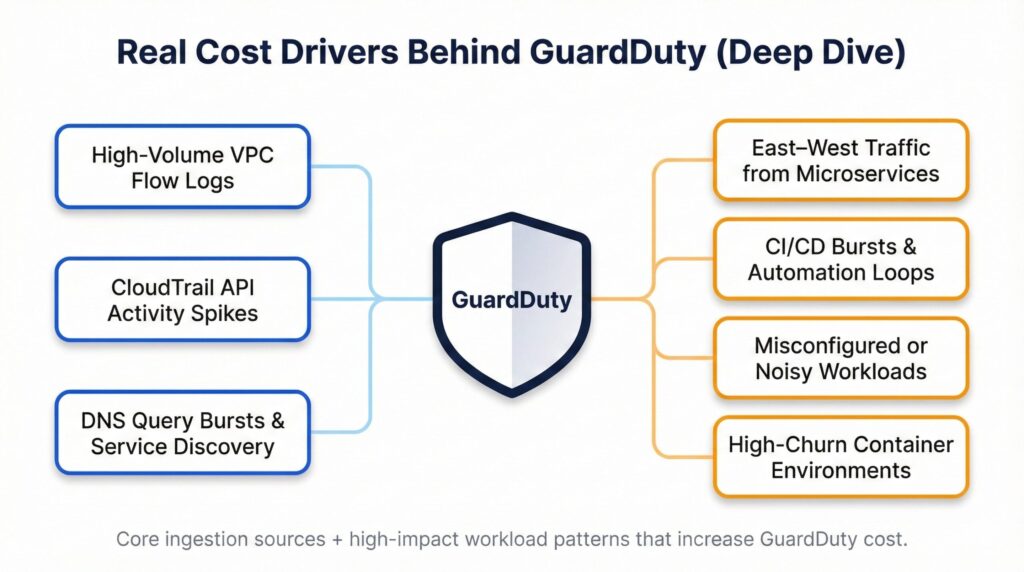
Having identified the main categories that drive GuardDuty pricing, we now want to zoom in on their significant cost drivers.
High-Volume Network Traffic and VPC Flow Logs
We normally expect this to drive GuardDuty pricing, but there are certain areas that contribute to costs more than others. Multi-region architectures generate east-west traffic between microservices that will generate large log volumes and thereby costs. Certain services, like load balancers and distributed systems, by their nature, will produce continuous network events, further driving up costs. Additionally, high-throughput applications, such as databases, will create sustained ingestion workloads. Whenever the system configures broad VPC Flow Logs that capture settings, it will amplify per-GB analysis costs.
CloudTrail and API Activity Spikes
CloudTrail is another significant cost driver for GuardDuty pricing, with specific sources contributing either bursty traffic or high-volume traffic. CI/CD pipelines are responsible for generating rapid bursts of API events upon initiating builds and deployments. A related source is when automation scripts repeatedly invoke high-volume operations. Also, a common source of high-volume CloudTrail traffic is misconfigured services that create excessive or looping API calls. Furthermore, there are sudden workflow surges that significantly increase CloudTrail ingestion costs. Another significant source of CloudTrail costs is cross-account roles and federated access patterns that drive additional API traffic.
AWS CloudTrail Logs to S3: Secure, Store, and Analyze Your AWS Activity provides more detail on CloudTrail logging.
DNS Queries, Containers, and Unusual Workload Patterns
As covered before, these significantly drive GuardDuty pricing due to the high volume of DNS queries and continuous service-discovery activity. Many containerized microservices are continually generating frequent internal and external DNS lookups, considerably contributing to ingestion costs. Along with DNS lookups, service-discovery mechanisms produce continuous background query traffic. Once again, our old friends, misconfigured or compromised workloads, are also generating plenty of DNS requests, further ramping up ingestion costs. Another source of high DNS queries comes from bot-like behavior or automated scanning activity.
Stop Paying for Noise: How to Reduce Unnecessary Findings
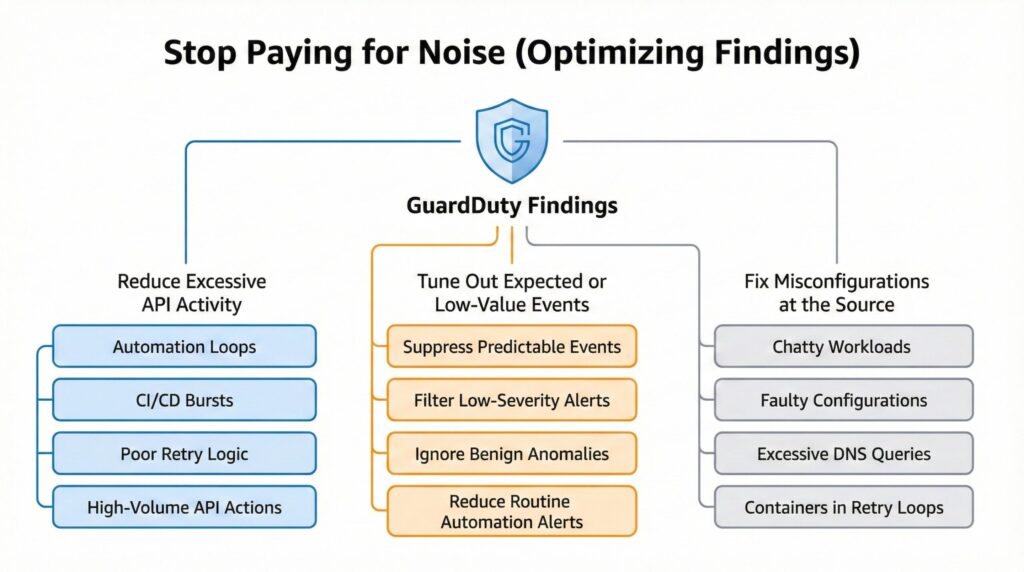
This diagram explains the three engineering techniques that reduce GuardDuty costs: lowering unnecessary API activity, tuning out low-value findings, and fixing noisy or misconfigured workloads that drive excessive log ingestion.
While there are many drivers behind GuardDuty pricing, there are opportunities to reduce costs. The main ones are sources generating data for GuardDuty with little or no value that we are paying for.
Reduce Excessive or Repetitive API Activity Racking up GuardDuty Pricing
API activity is what drives CloudTrail ingestion costs for GuardDuty pricing, with many occurrences not delivering any value. Engineers should identify automation loops that repeatedly invoke the same high-volume API operations and seek to simplify these. They should also prune CI/CD workflows that generate unnecessary or overly frequent deployment efforts. Also, poor retry or backoff logic results in applications making redundant API calls, which engineers can refactor. Another area of refactoring is services triggering large bursts of CloudTrail entries during normal operations.
Tune Findings to Ignore Low-Value or Expected Behaviors
These are optimizations that engineers can apply to GuardDuty to reduce its pricing. They can configure GuardDuty to suppress recurring findings that are tied to predictable operational patterns. Additionally, set up GuardDuty to filter low-severity events that consistently yield no actionable value but add to costs. Often, normal workload behavior has benign anomalies associated with it, which GuardDuty should remove so they are not driving up costs. Also, reduce alerts triggered by routine automation or scheduled tasks to avoid associated costs.
Fix Misconfigurations and Noisy Workloads at the Source
Good system design should eliminate these anyway, and it is poor practice to allow these and rack up GuardDuty pricing unnecessarily. Identifying scripts or services that invoke APIs far more frequently than required is always a quick win. Also, finding containers stuck in tight service-discovery or retry loops should be done on a regular basis. Another source of wasteful activities is applications that generate unnecessary DNS queries or outbound calls. Moreover, allowing faulty configurations is poor cloud management since they repeatedly trigger anomaly detections, adding to costs.
S3 Protection and EKS Runtime Monitoring: When to Add Them to GuardDuty Pricing
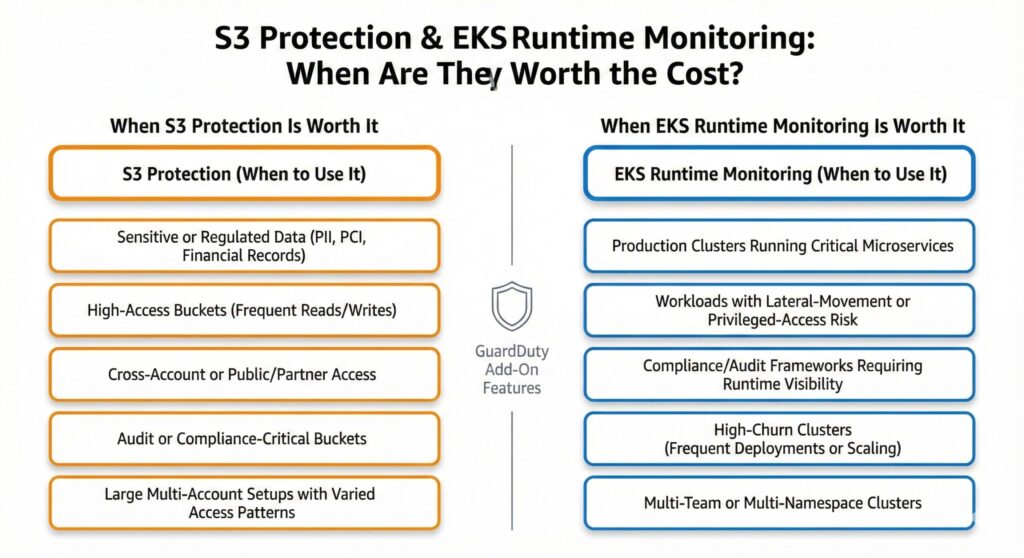
Add-ons are the unpredictable component of GuardDuty pricing, and it is valuable to review their necessity for any solution.
When S3 Protection Earns Its Keep
Not all stored objects warrant Fort Knox security, and GuardDuty enables us to filter low-value buckets to save on costs. Therefore, we can apply S3 Protection to high-value buckets, including those storing sensitive or regulated data such as PII, PCI, or financial records. Another class of buckets is high-access that supports frequent reads, writes, or cross-account activity. Buckets storing audit trails or compliance verification for every object action are also prime candidates for S3 Protection. Additionally, buckets that are exposed to public or partner-facing access patterns with elevated risk also require S3 Protection. Moreover, large multi-account setups where S3 access behavior varies widely across teams need elevated protection.
When EKS Runtime Monitoring Is Worth the Spend
EKS clusters often run applications that do not require elevated protection, adding unnecessarily to GuardDuty pricing. Clusters that require EKS Runtime Monitoring include production Kubernetes clusters running mission-critical microservices. Another cluster class requiring EKS Runtime Monitoring is workloads with meaningful lateral-movement risk or privileged container operations. Additionally, environments that require runtime visibility for compliance or audit frameworks need EKS Runtime Monitoring enabled. Also, clusters needing monitoring are high-churn clusters with frequent deployments, scaling events, or container rotation. Moreover, engineers should apply monitoring to multi-team or multi-namespace EKS setups where workload behavior varies significantly.
GuardDuty Cost Optimization Best Practices
Having considered various avenues to better manage GuardDuty pricing, we will now consider some best practices around cost optimization.
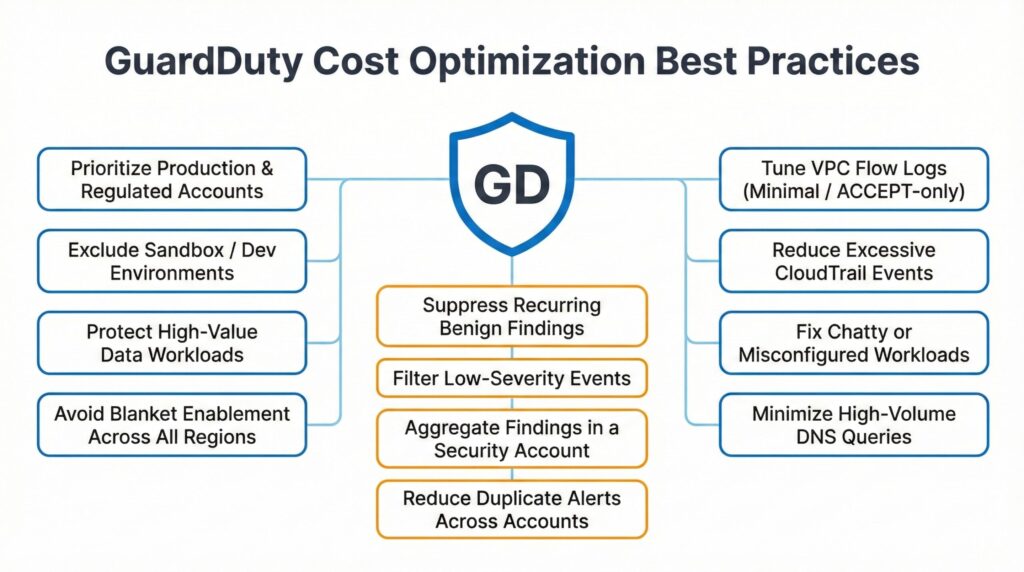
Scope GuardDuty to High-Value Accounts and Workloads
This is a developing theme in directing GuardDuty towards the AWS resources with the greatest impact from threats for managing pricing. Therefore, engineers should prioritize production, regulated, or customer-facing environments where threats carry significant impact and damage. In contrast, exclude low-value development or sandbox accounts that generate noise but have minimal security benefit. Another important practice is to apply GuardDuty selectively to workloads that store sensitive or financially significant data. Finally, avoid blanket enablements across all accounts and regions to reduce unnecessary log ingestion.
CloudWatch Metrics Dimensions: Best Practices That Prevent Cardinality Chaos covers monitoring that complements GuardDuty’s detection.
Filter and Centralize Findings for Smart GuardDuty Pricing Management
This is the next stage of the GuardDuty pipeline, after sources generate their data, to curate it. That involves suppressing low-severity or recurring benign findings that consistently add noise to any GuardDuty analysis. It is also advisable to route all GuardDuty findings to a central Security Hub or security account for unified analysis. This reduces GuardDuty analysis costs when distributed across multiple accounts since findings are aggregated centrally, and redundant analysis is avoided in low-value accounts. Another quick win is to apply filtering rules to ignore predictable operational events with no actionable value but still add to costs. Engineers can extend this principle to reducing duplicate or redundant alerts across accounts by consolidating detection logic.
Reduce Ingestion Costs Through Better Logging Practices
These were covered in earlier sections, but are worth reiterating since they are fundamental to best practices around GuardDuty pricing. Engineers can set up VPC Flow Logs tuning to minimal formats or ACCEPT-only modes to lower per-GB analysis volume. Additionally, reduce unnecessary CloudTrail API activity from automation loops, CI/CD systems, or misconfigured services. Also, minimize excessive DNS queries by improving workload design and fixing chatty applications. Especially look at eliminating noise or faulty configurations that repeatedly generate high ingestion network and API events.
Summary: Mastering GuardDuty Pricing Through Smart Engineering
The main consideration for GuardDuty pricing is that it depends primarily on log ingestion volume and not on the findings it generates. This translates into the fact that the main GuardDuty cost drivers are CloudTrail, VPC Flow Logs, and DNS queries. Accordingly, given that they are the main cost drivers, any noisy workloads, misconfigurations, and automation loops will significantly inflate GuardDuty costs. Alongside these sources are add-ons such as S3 Protection and EKS Runtime Monitoring, and engineers should enable them selectively based on workload value. Also, whenever GuardDuty is enabled too broadly across accounts and regions, then many environments will overspend. Moreover, tuning findings and filtering expected behaviors will reduce unnecessary analysis and lower costs.
Best practices highly recommend scoping GuardDuty to high-value workloads and centralized findings. Therefore, effective GuardDuty pricing is achieved through intentional engineering choices, not through bill reviews.
To explore the response to GuardDuty findings, please check out AWS Security Incident Response Guide: Protect AWS with Confidence.
Further Reading
Affiliate Disclosure: As an Amazon Associate, AI Cloud Data Pulse earns from qualifying purchases. Some links in this article are Amazon affiliate links. If you purchase a product through these links, we may earn a small commission at no additional cost to you. We only recommend resources that we believe provide value to our readers.
AWS Certified Security – Specialty Exam Guide by Stuart Scott
AWS Security by Dylan Shields
Mastering AWS Security by Albert Anthony
Cloud FinOps: Collaborative, Real-Time Cloud Financial Management by J. R. Storment and Mike Fuller